%20--%3e%3cdefs%3e%3cstyle%3e%20.st0%20{%20fill:%20%23fe8a24;%20}%20.st1%20{%20fill:%20%23505055;%20}%20%3c/style%3e%3c/defs%3e%3cg%3e%3cpath%20class='st1'%20d='M947.64,64.98h-43.49v-3.05c0-10.49,2.54-17.09,21.83-17.09s21.66,6.6,21.66,17.09v3.05ZM971.33,89.01v-1.18h-23.69c0,6.43-3.89,11.17-20.99,11.17-18.61,0-22.51-6.26-22.51-16.24v-4.23h67.18v-18.79c0-16.08-4.57-29.44-45.35-29.44s-45.35,13.37-45.35,29.44v24.71c0,15.91,5.25,29.44,46.03,29.44,35.54,0,44.68-8.97,44.68-24.87M863.16,84.44v-3.89h-24.2v1.18c0,10.49-1.86,17.1-21.15,17.1s-21.33-6.6-21.33-17.1v-19.29c0-10.49,2.03-17.09,21.33-17.09s21.15,6.6,21.15,17.09v.51h24.2v-3.22c0-16.08-4.57-29.45-45.35-29.45s-45.36,13.37-45.36,29.45v24.71c0,15.91,4.57,29.44,45.36,29.44,40.78,0,45.35-13.53,45.35-29.44M754.99,112.87v-52.8c0-18.79-6.26-29.78-36.55-29.78-15.91,0-26.4,4.23-30.63,11l-1.69-9.98h-21.83v81.56h24.2v-46.03c0-15.74,6.77-20.65,24.03-20.65,14.04,0,18.28,4.23,18.28,15.91v50.77h24.2ZM623.12,64.98h-43.49v-3.05c0-10.49,2.54-17.09,21.83-17.09s21.66,6.6,21.66,17.09v3.05ZM646.81,89.01v-1.18h-23.7c0,6.43-3.89,11.17-20.99,11.17-18.61,0-22.51-6.26-22.51-16.24v-4.23h67.19v-18.79c0-16.08-4.57-29.44-45.36-29.44s-45.35,13.37-45.35,29.44v24.71c0,15.91,5.24,29.44,46.03,29.44,35.54,0,44.68-8.97,44.68-24.87M538.64,31.31h-24.2v81.56h24.2V31.31ZM402.87,64.98h-43.49v-3.05c0-10.49,2.54-17.09,21.83-17.09s21.66,6.6,21.66,17.09v3.05ZM426.56,89.01v-1.18h-23.69c0,6.43-3.89,11.17-20.98,11.17-18.61,0-22.51-6.26-22.51-16.24v-4.23h67.18v-18.79c0-16.08-4.57-29.44-45.35-29.44s-45.36,13.37-45.36,29.44v24.71c0,15.91,5.25,29.44,46.03,29.44,35.54,0,44.68-8.97,44.68-24.87M294.19,62.1v19.98c0,11.68-4.23,16.08-18.28,16.08-17.26,0-24.03-5.08-24.03-20.82v-10.32c0-15.74,6.77-20.98,24.03-20.98,14.05,0,18.28,4.4,18.28,16.07M318.39,59.57c0-16.75-6.26-29.28-36.55-29.28-15.91,0-26.4,4.23-30.63,11l-1.69-9.99h-21.83v112.87h24.2v-41.29c4.23,6.77,13.88,11,29.95,11,30.29,0,36.56-12.52,36.56-29.27v-25.05h0Z'/%3e%3cpath%20class='st1'%20d='M66,82.25c0,11.33-9.48,16.75-27.92,16.75-7.79,0-14.04-2.88-14.04-11.68s3.04-11.34,15.06-11.34h26.91v6.26h0ZM90.03,112.87v-53.13c0-16.08-4.23-29.44-44.34-29.44C11.34,30.29,3.55,39.94,3.55,53.31l24.37,1.02c0-5.92,3.39-9.81,17.77-9.81,18.11,0,20.31,6.26,20.31,16.08v1.69h-33.34C13.03,62.28,0,68.71,0,86.14s8.13,27.75,33.34,27.75c19.29,0,28.94-4.23,33.17-11l1.69,9.98h21.84Z'/%3e%3cpath%20class='st1'%20d='M196.59,59.4l-10.83-4.06,10.83-4.06c8.46-3.22,12.35-10.83,12.35-19.12V0h-25.21v29.62c0,10.66-5.92,16.42-19.46,16.42h-10.83c-13.54,0-19.46-5.76-19.46-16.42V0h-25.21v32.16c0,8.29,3.89,15.9,12.35,19.12l10.83,4.06-10.83,4.06c-8.46,3.22-12.35,10.83-12.35,19.12v34.35h25.21v-31.81c0-10.66,5.92-16.42,19.46-16.42h10.83c13.54,0,19.46,5.75,19.46,16.42v31.81h25.21v-34.35c0-8.29-3.89-15.91-12.35-19.13'/%3e%3c/g%3e%3cpolygon%20class='st0'%20points='146.67%20-.04%20146.67%2020.27%20170.87%2020.27%20170.97%2020.27%20170.97%20-.04%20146.67%20-.04'/%3e%3cpath%20class='st1'%20d='M500.43,30.41c-.72-.04-1.42-.11-2.17-.11-15.91,0-26.4,4.23-30.63,11l-1.69-9.98h-21.83v81.57h24.2v-46.2c0-13.88,6.77-19.46,24.03-19.46,2.66,0,5.42.27,8.09.67v-17.48Z'/%3e%3c/svg%3e)
Plan visits. Schedule service assignments.
Visit Manager plans field sales visits and service assignments – with the right person and vehicle – and reports the results back to Dynamics 365.
Contact & quote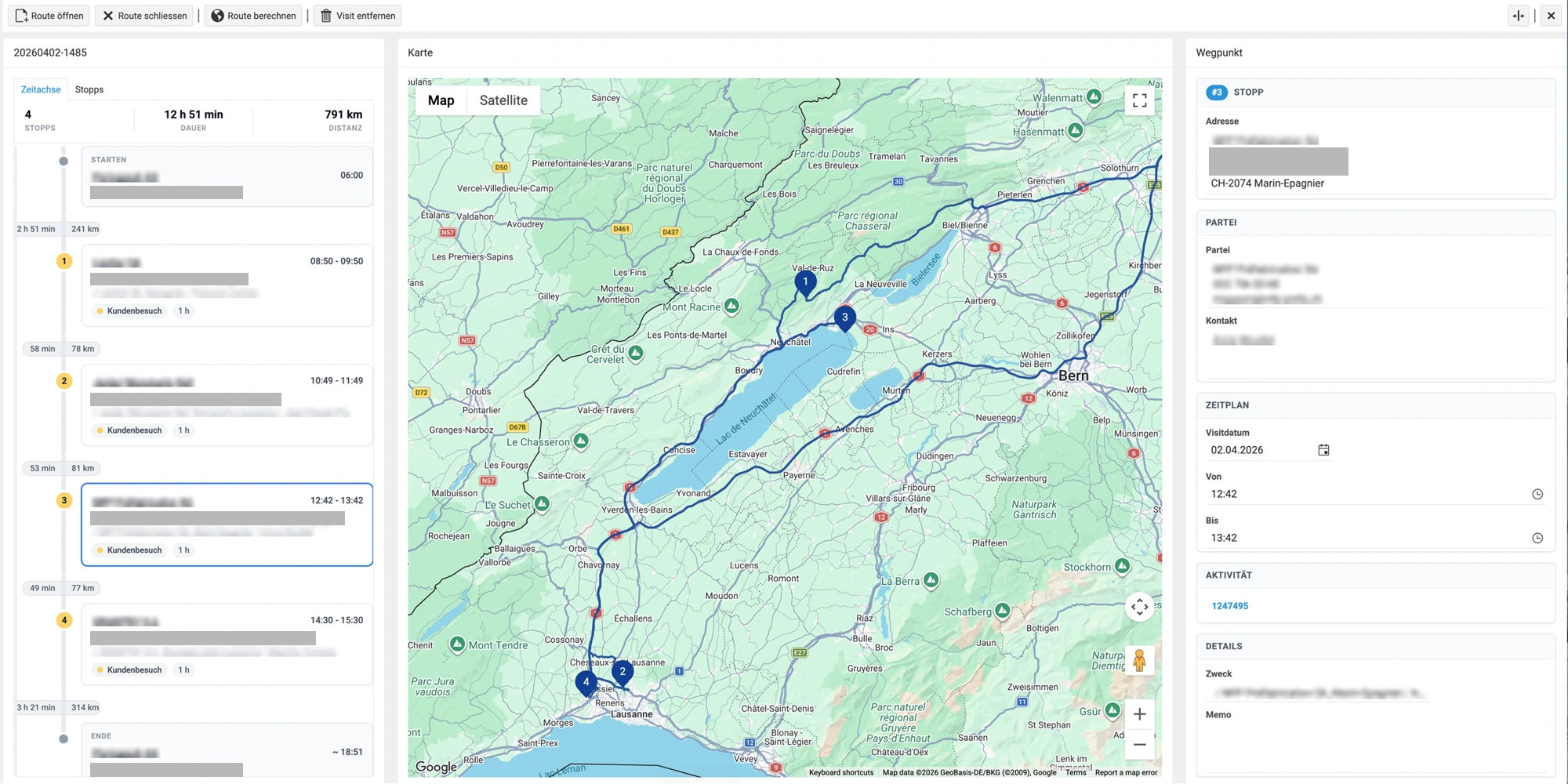
One planning board, two ways of working.
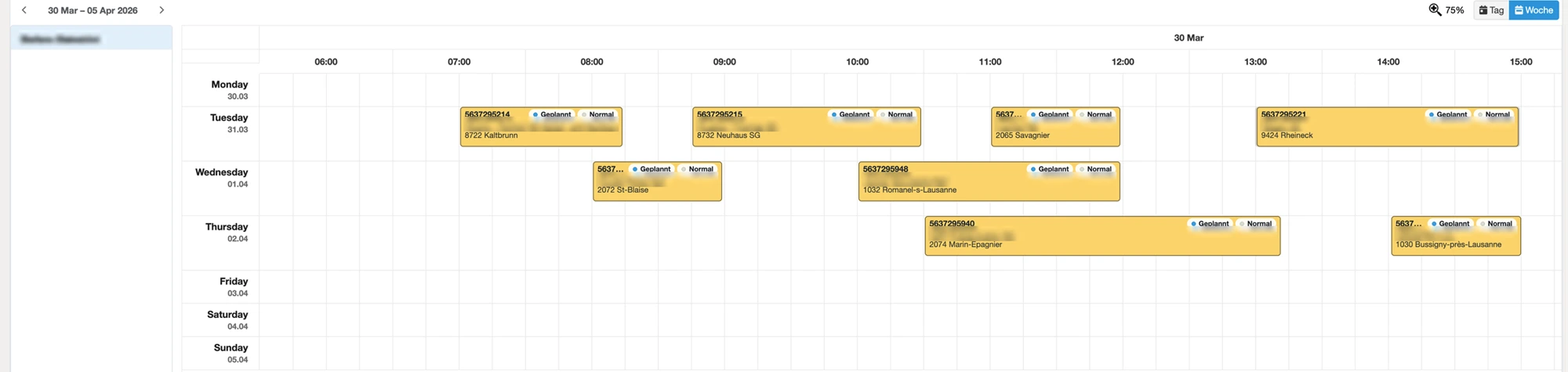
Plan your own week or schedule today's work for all employees: the same planning board supports field sales and service.
Field sales: plan the week
Employees distribute visits from the backlog across the week. Fixed appointments stay in place; an optimised route is created for each day. The next visit and its purpose are recorded at the same time – for sales and customer care.
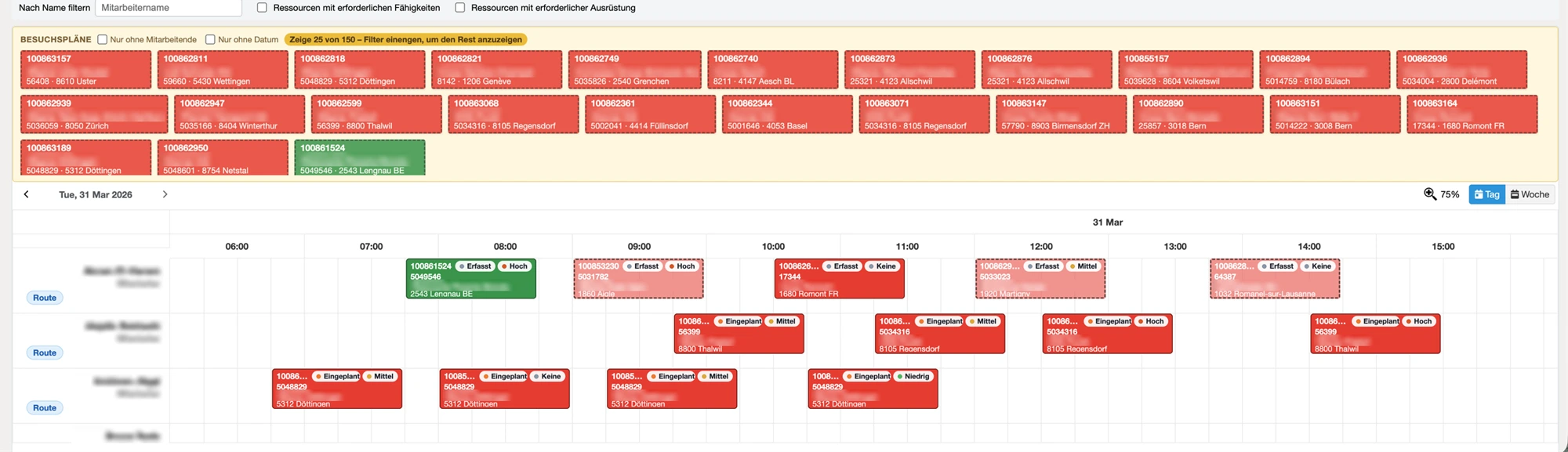
Service: schedule the day
Dispatchers see all employees for the day side by side. New incidents include a deadline and priority. The board shows who has the skills and which vehicle carries the equipment. Schedule by drag & drop – the route is recalculated.
How it works.
- 1
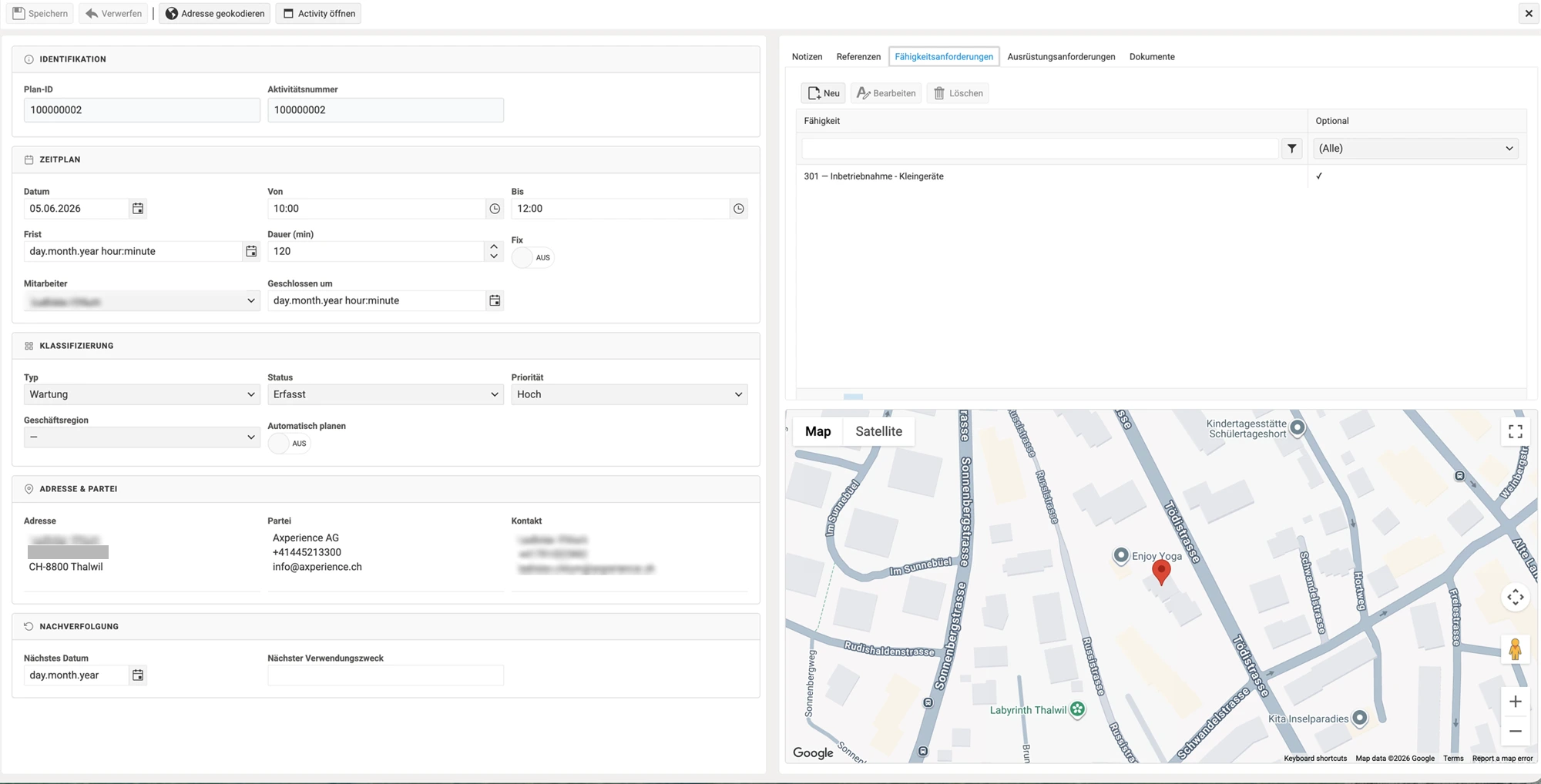
Create case
In Dynamics 365, from a customer, contact, order or quotation – or via API. The address is geocoded automatically.
- 2
Schedule
Assign to an employee and a day on the planning board, in the weekly or daily view.
- 3
Calculate route
Google Maps optimises the sequence for each employee and day and calculates driving time and time on site.
- 4
Report back
Appointment, notes, next visit and purpose are returned to the ERP; the CRM activity is updated.
The right person, the right vehicle.
Each case has its requirements: skills such as certifications and equipment such as spare parts or devices – with quantities if required.
Match skills
A dedicated catalogue describes employees' skills. The board can be filtered by suitable qualifications.
Equipment by vehicle
Vehicles list their equipment; models serve as templates. This ensures technicians arrive with the materials they need.
Deadline and priority
Each case shows its urgency. Filters highlight overdue and delayed cases.
Statuses that follow your process.
Custom statuses and transitions
You define statuses, colours and permitted transitions. Events such as «Route assigned» set the status automatically.
Fixed appointments as anchors
The date and time remain locked. Other stops are planned around them – even when an appointment takes longer.
Recalculate subsequent visits
On completion, the remaining route for the day is recalculated. Delays shift subsequent stops; fixed appointments stay in place.
Include additional cases
Open cases at the same address can be added to the schedule with one click.
Everything planning requires.
Planning
Weekly and daily views, deadline, priority, time windows, documents and references for each case.
Resources
Employees with starting address, skills, holidays and calendars; vehicles, models and equipment.
Routes and integration
Map and timeline, business regions and postcodes, plus direct links to Dynamics 365.
Technical facts.
- Product
- Visit Manager, part of the Shipment Manager platform
- Hosting
- Microsoft Azure – in the browser
- Sign-in
- Microsoft Entra ID, roles and permissions by area
- Languages
- German, English, French, Italian
- ERP
- Extension for Dynamics 365 Finance & Supply Chain Management
- Synchronisation
- REST API with OAuth 2.0, retries on failure and logging
- Routes
- Google Maps: routing, optimisation and geocoding
- Documents
- PDF attachments for each case in Azure Blob Storage
Your next step with Visit Manager.
Whether you have an initial question, would like a personal demo or need a tailored quote – we are here for you. Visit Manager is available on request.
Have a question?
We answer your questions about features, interfaces and using the solution in your company.
Ask a questionExperience the solution live
Discover in a personal conversation how the app can support your processes.
Book a demo