%20--%3e%3cdefs%3e%3cstyle%3e%20.st0%20{%20fill:%20%23fe8a24;%20}%20.st1%20{%20fill:%20%23505055;%20}%20%3c/style%3e%3c/defs%3e%3cg%3e%3cpath%20class='st1'%20d='M947.64,64.98h-43.49v-3.05c0-10.49,2.54-17.09,21.83-17.09s21.66,6.6,21.66,17.09v3.05ZM971.33,89.01v-1.18h-23.69c0,6.43-3.89,11.17-20.99,11.17-18.61,0-22.51-6.26-22.51-16.24v-4.23h67.18v-18.79c0-16.08-4.57-29.44-45.35-29.44s-45.35,13.37-45.35,29.44v24.71c0,15.91,5.25,29.44,46.03,29.44,35.54,0,44.68-8.97,44.68-24.87M863.16,84.44v-3.89h-24.2v1.18c0,10.49-1.86,17.1-21.15,17.1s-21.33-6.6-21.33-17.1v-19.29c0-10.49,2.03-17.09,21.33-17.09s21.15,6.6,21.15,17.09v.51h24.2v-3.22c0-16.08-4.57-29.45-45.35-29.45s-45.36,13.37-45.36,29.45v24.71c0,15.91,4.57,29.44,45.36,29.44,40.78,0,45.35-13.53,45.35-29.44M754.99,112.87v-52.8c0-18.79-6.26-29.78-36.55-29.78-15.91,0-26.4,4.23-30.63,11l-1.69-9.98h-21.83v81.56h24.2v-46.03c0-15.74,6.77-20.65,24.03-20.65,14.04,0,18.28,4.23,18.28,15.91v50.77h24.2ZM623.12,64.98h-43.49v-3.05c0-10.49,2.54-17.09,21.83-17.09s21.66,6.6,21.66,17.09v3.05ZM646.81,89.01v-1.18h-23.7c0,6.43-3.89,11.17-20.99,11.17-18.61,0-22.51-6.26-22.51-16.24v-4.23h67.19v-18.79c0-16.08-4.57-29.44-45.36-29.44s-45.35,13.37-45.35,29.44v24.71c0,15.91,5.24,29.44,46.03,29.44,35.54,0,44.68-8.97,44.68-24.87M538.64,31.31h-24.2v81.56h24.2V31.31ZM402.87,64.98h-43.49v-3.05c0-10.49,2.54-17.09,21.83-17.09s21.66,6.6,21.66,17.09v3.05ZM426.56,89.01v-1.18h-23.69c0,6.43-3.89,11.17-20.98,11.17-18.61,0-22.51-6.26-22.51-16.24v-4.23h67.18v-18.79c0-16.08-4.57-29.44-45.35-29.44s-45.36,13.37-45.36,29.44v24.71c0,15.91,5.25,29.44,46.03,29.44,35.54,0,44.68-8.97,44.68-24.87M294.19,62.1v19.98c0,11.68-4.23,16.08-18.28,16.08-17.26,0-24.03-5.08-24.03-20.82v-10.32c0-15.74,6.77-20.98,24.03-20.98,14.05,0,18.28,4.4,18.28,16.07M318.39,59.57c0-16.75-6.26-29.28-36.55-29.28-15.91,0-26.4,4.23-30.63,11l-1.69-9.99h-21.83v112.87h24.2v-41.29c4.23,6.77,13.88,11,29.95,11,30.29,0,36.56-12.52,36.56-29.27v-25.05h0Z'/%3e%3cpath%20class='st1'%20d='M66,82.25c0,11.33-9.48,16.75-27.92,16.75-7.79,0-14.04-2.88-14.04-11.68s3.04-11.34,15.06-11.34h26.91v6.26h0ZM90.03,112.87v-53.13c0-16.08-4.23-29.44-44.34-29.44C11.34,30.29,3.55,39.94,3.55,53.31l24.37,1.02c0-5.92,3.39-9.81,17.77-9.81,18.11,0,20.31,6.26,20.31,16.08v1.69h-33.34C13.03,62.28,0,68.71,0,86.14s8.13,27.75,33.34,27.75c19.29,0,28.94-4.23,33.17-11l1.69,9.98h21.84Z'/%3e%3cpath%20class='st1'%20d='M196.59,59.4l-10.83-4.06,10.83-4.06c8.46-3.22,12.35-10.83,12.35-19.12V0h-25.21v29.62c0,10.66-5.92,16.42-19.46,16.42h-10.83c-13.54,0-19.46-5.76-19.46-16.42V0h-25.21v32.16c0,8.29,3.89,15.9,12.35,19.12l10.83,4.06-10.83,4.06c-8.46,3.22-12.35,10.83-12.35,19.12v34.35h25.21v-31.81c0-10.66,5.92-16.42,19.46-16.42h10.83c13.54,0,19.46,5.75,19.46,16.42v31.81h25.21v-34.35c0-8.29-3.89-15.91-12.35-19.13'/%3e%3c/g%3e%3cpolygon%20class='st0'%20points='146.67%20-.04%20146.67%2020.27%20170.87%2020.27%20170.97%2020.27%20170.97%20-.04%20146.67%20-.04'/%3e%3cpath%20class='st1'%20d='M500.43,30.41c-.72-.04-1.42-.11-2.17-.11-15.91,0-26.4,4.23-30.63,11l-1.69-9.98h-21.83v81.57h24.2v-46.2c0-13.88,6.77-19.46,24.03-19.46,2.66,0,5.42.27,8.09.67v-17.48Z'/%3e%3c/svg%3e)
Returnable containers in view. At every location.
Empties Management shows how many pallets, pallet cages and other load carriers are where – at your hubs, suppliers and customers – and tracks every movement in full.
Contact & quote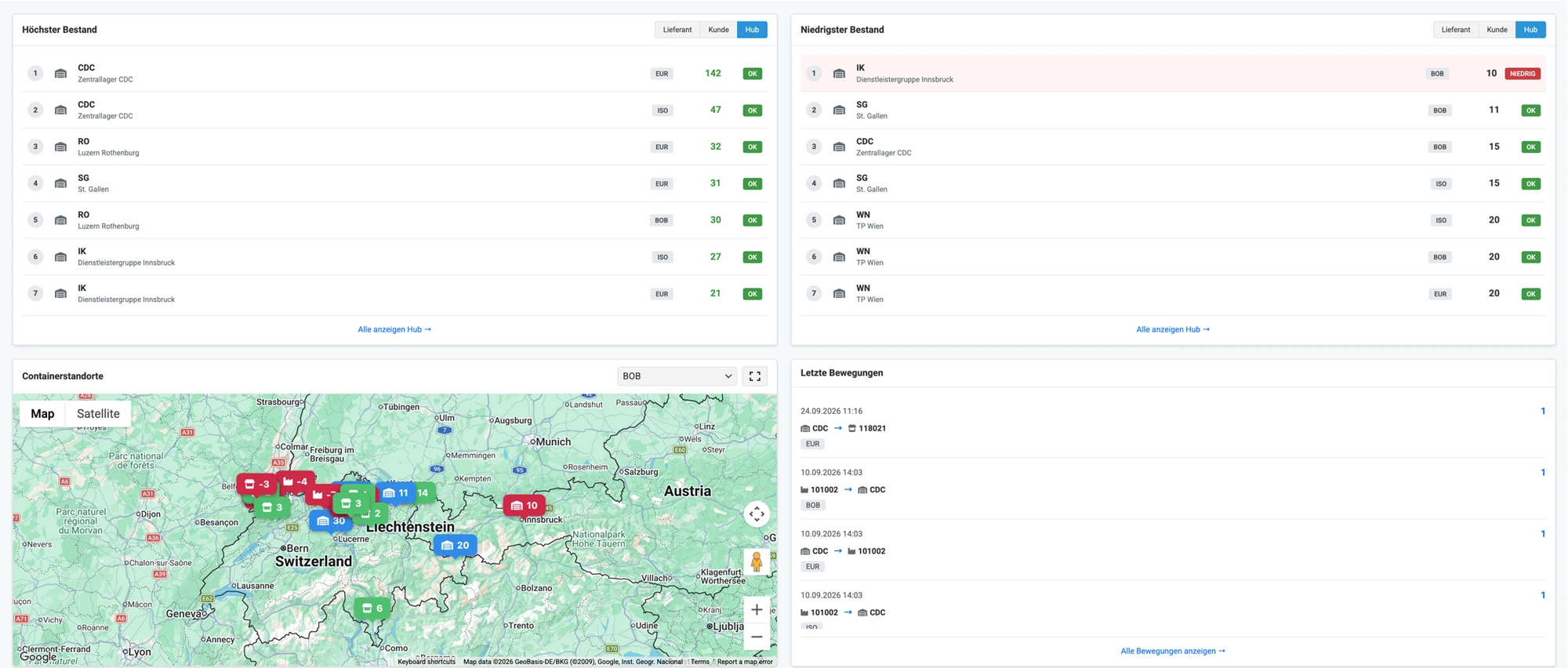
Stock levels you can trust.
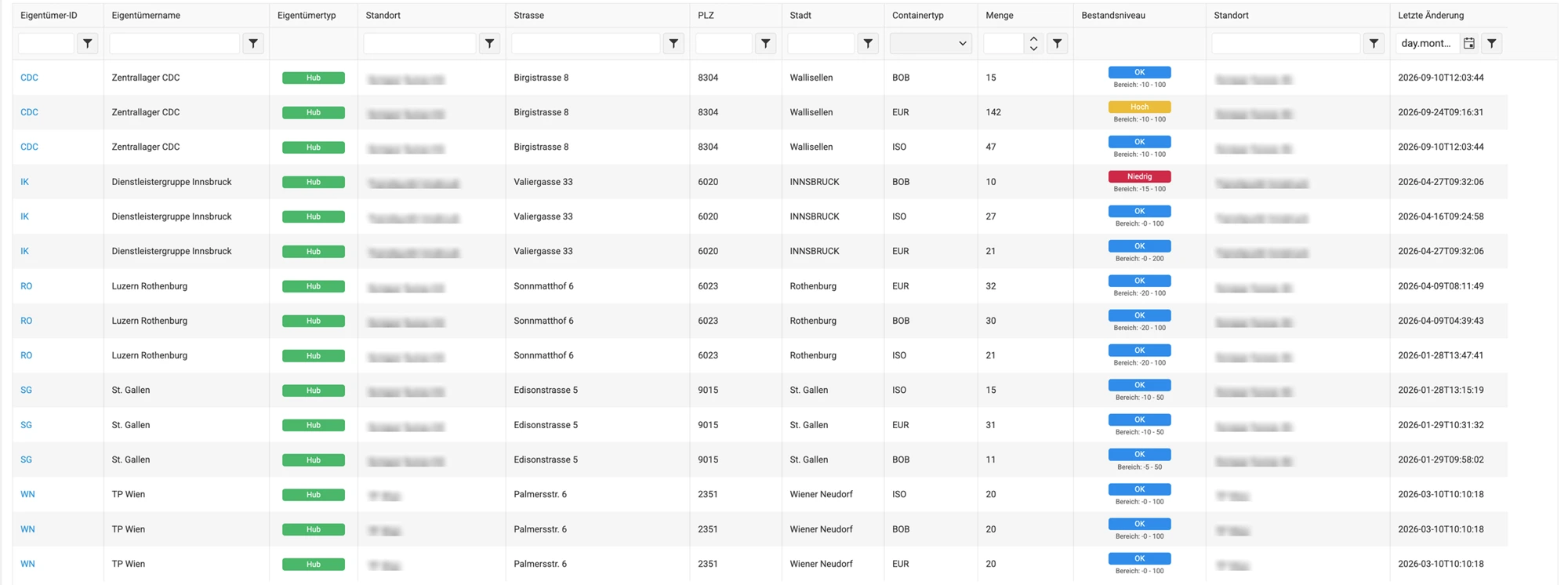
Load carriers are money in circulation. Instead of Excel lists and pallet receipts, a central stock record shows how many containers are where – and why.
Three location types
Stock at your own hubs, suppliers and customers – broken down by container type.
Balance from movements
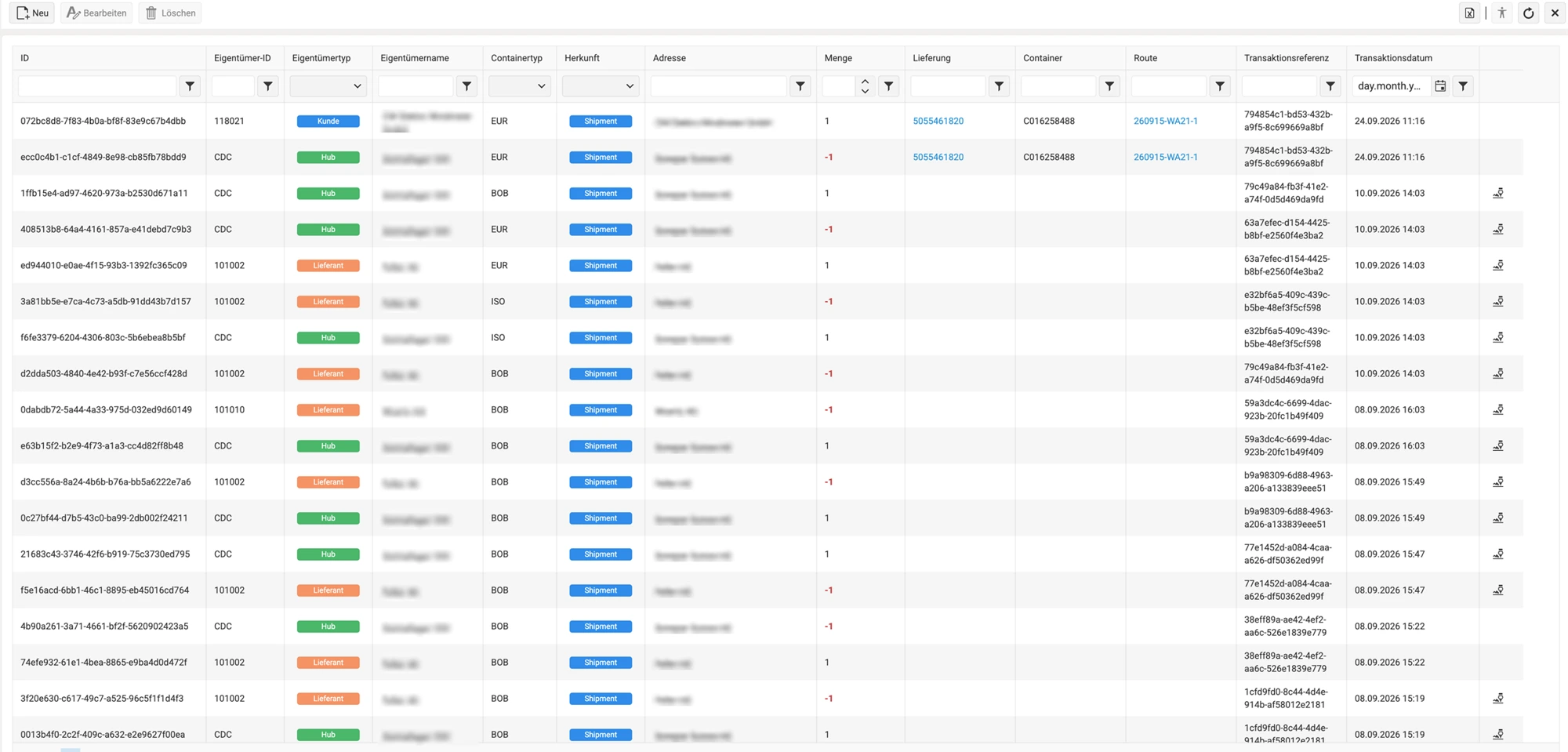
Every stock balance is the sum of its transactions. The history explains credits and liabilities for each partner.
Timely replenishment
Minimum and maximum capacities for each hub and container type show stock as Low, OK or High – before containers run short or accumulate.
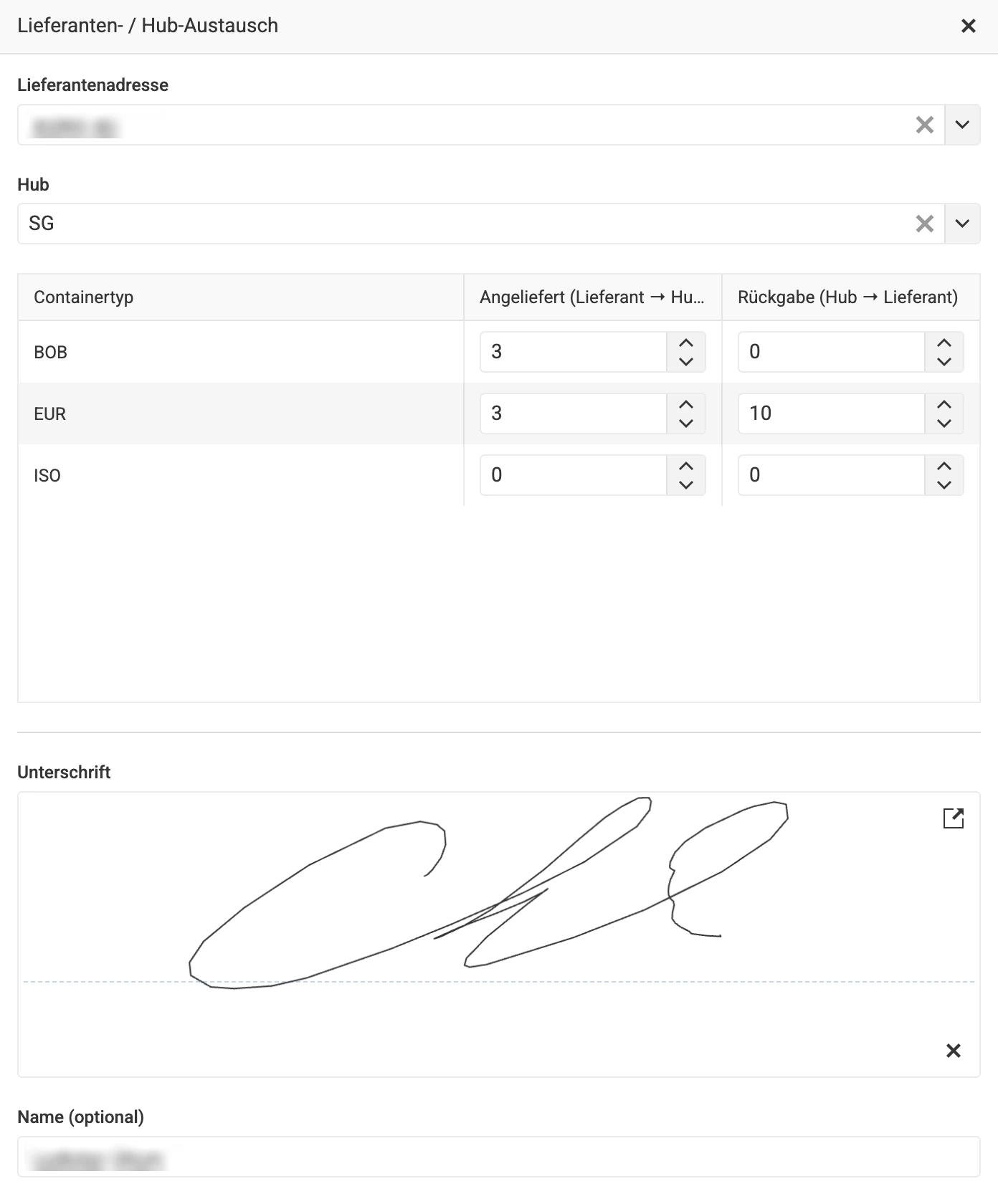
Exchange with a signature.
A supplier or customer brings returnable containers and takes others away. Incoming and outgoing quantities appear side by side in the exchange dialogue; both are posted in one step.
Capture on a tablet
Hub staff record the exchange directly at goods receipt and immediately see what the partner should take back.
Posting on both sides
The receipt at the hub and the issue at the partner share a common reference.
Evidence, not assumptions
If required, the partner signs on the tablet. Their name and the time are stored together with the proof.
Every movement has a source.
Each transaction records container type, quantity, location, reference, time and user. For tours, the delivery and route are also traceable.
Delivery and exchange
Collection and return are documented at the stop or during exchange at the hub.
Manual postings
Corrections and special cases can be entered manually.
Loss and damage
Containers that are not returned or are retired are written off with full traceability to their source.
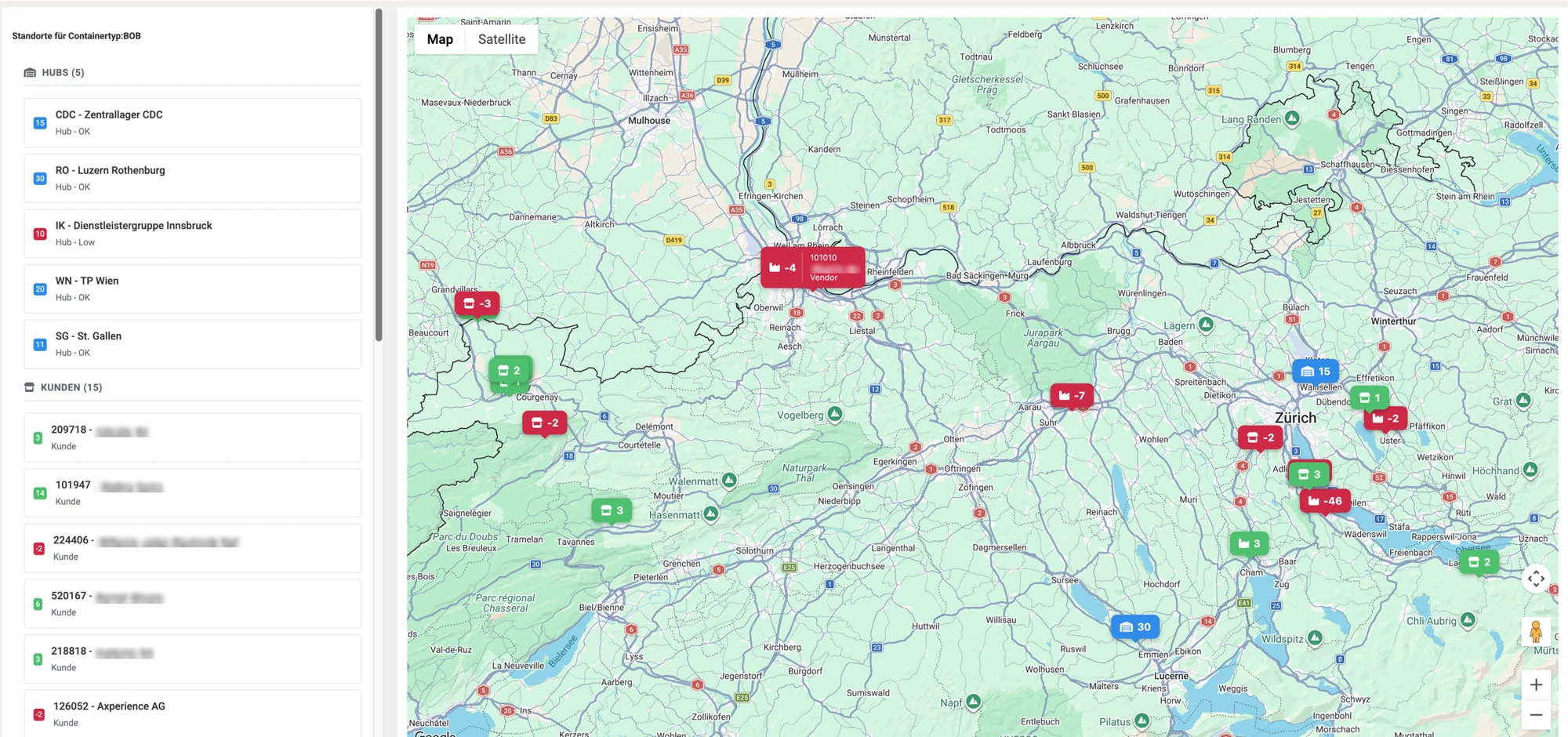
Returnable containers in view. At every location.
The Google Maps map shows quantities at each location by container type. Identify shortages and excess stock across all locations.
Flexible container types
Euro pallets, pallet cages and other load carriers are set up in the master data.
Locations with history
Each location has a position on the map and a complete movement history.
Manage stock
Highest and lowest stock levels show where replenishment or rebalancing is needed.
"Lost returnable containers cost real money – and often go unnoticed. Empties Management provides transparency: you always know how many pallets and boxes are where and who has them. This means fewer containers are lost, fewer replacements are ordered and returns can be requested in a targeted way. This transparency is the key to significantly reducing costs."

Benjamin Wilhelm
Software Developer at Axperience
Standalone or with Shipment Manager.
Empties Management runs independently – or connected to your delivery operations.
Standalone: capture on a tablet
At the hub, staff record incoming quantities and returns in one step, with an optional signature. Movements, addresses and container types can be imported from your ERP via REST API.
With Shipment Manager: post at the stop
In the Android app, drivers collect or return load carriers directly at the stop. Matching entries are posted automatically for the customer and departure hub.
How it works.
- 1
Set up master data
Record container types and returnable-container addresses for hubs, suppliers and customers, including map positions.
- 2
Initialise hubs
Set the opening stock and minimum/maximum capacity for each hub and container type.
- 3
Record movements
Post on a tablet, in the Android app, manually or automatically from the ERP via API.
- 4
Manage stock
The stock overview, map and history show distribution, shortages and excess stock.
Technical facts.
- Product
- Standalone or as part of the Shipment Manager platform
- Hosting
- Microsoft Azure – in the browser and on a tablet
- Sign-in
- Microsoft Entra ID, roles and permissions by area
- Languages
- German, English, French, Italian
- Mobile
- Android app for drivers with Shipment Manager
- Interface
- REST API for movements, addresses and container types
- Maps
- Google Maps, geographic coordinates for each location
- Signatures
- Azure Blob Storage, with name and time
Empties Management subscription
Monthly
CHF 380.- per month
CHF 4’560.- per year
Annually – 17% less
CHF 760.- saved per year
CHF 3’800.- per year instead of CHF 4’560.- – equivalent to CHF 316.67 per month
Your next step with Empties Management.
Get answers to your questions, experience Empties Management live or request your tailored quote.
Have a question?
We answer your questions about features, interfaces and using the solution in your company.
Ask a questionExperience the solution live
Discover in a personal conversation how the app can support your processes.
Book a demo